> ## Documentation Index
> Fetch the complete documentation index at: https://uncoded.ch/docs/llms.txt
> Use this file to discover all available pages before exploring further.
# 5. Initial Bot Configuration & first start
Once the deployment is finished, you must perform the initial setup to activate your trading strategy.
***
This video is in German by default. However, you can enable YouTube’s automatic translation.
Open your web browser and navigate to your dashboard using your server's IP and the port you defined during installation (default: `4000`):
`http://YOUR-SERVER-IP:4000`
> [Move on with Step 2 if you're using Netcup / Railway](#setup-wizard)
***
* **Login:** Use the App Password you created during the initial deployment.
**If you are using [Zeabur](/zeabur-server-setup-1), follow** this **guide to access your Dashboard:**
* Go to [https://zeabur.com/projects](https://zeabur.com/projects) and open your unCoded-Project.
* Click on "unCodedDashboard" and then, under "Domains," click the link you configured (`YOUR-DOMAIN.zeabur.app`).
The system will guide you through a 4-step wizard to configure your first bot:
* **Step 1: Select Bot Type**
* **High Frequency Trading:** Best for rapid trades on a single pair with automated risk management.
* **Multiple Token Trading:** Allows trading multiple pairs simultaneously with individual risk settings.
* **Step 2: Risk Profile**
* Choose between Low, Medium, or High Risk. These presets adjust your trade sizes and margins automatically.
* **Step 3: Select Trading Pair**
* Pick your desired pair (e.g., ETHUSDC). You can filter the list by base currencies like USDT, USDC, or FDUSD.
* **Step 4: Summary**
* Review your configuration and click "Get Started" to move to the final activation.
***
💡To finalize the setup, you must link your account and accept the **terms and conditions**.
**Google Account Link**
* **Process:** Open the provided Google device link and enter the unique code shown on your dashboard.
* **Important:** You must use **the same** Google Account you used to register at [uncoded.ch/account](https://www.uncoded.ch/account) where your Exchange UID /API Key is deposited.
* The system will display a confirmation once the account is linked and ready.
**Terms & Launch**
* Review the Terms of Service.
* Check the box: "I have read and agree to the terms and conditions".
* Click "Start Trading" to go live.
***
Your bot is now operational. You can now monitor the following in real-time:
* Licence Balance: Your remaining trading credits.
* Total Profit: Your accumulated earnings in USD.
* Trading Bot Logs: A live feed of every action taken by the bot.
***
**Next Steps: Optimization & Advanced Settings**
**Congratulations!** Your unCoded Trading Bot is now live and monitoring the markets in real-time.
Now that the basic setup is complete, you can begin to fine-tune your strategy. To get the most out of your bot, we recommend exploring the **Advanced Parameters** in the settings. There, you can:
* **Adjust Trading Modes:** Switch between different operational modes to match changing market conditions.
* **Fine-tune Parameters:** Customize trade volumes, profit targets, and stop-loss thresholds to align perfectly with your risk appetite.
* **Review Logs:** Use the real-time "Bot Logs" to understand how your specific settings are performing in the current market.
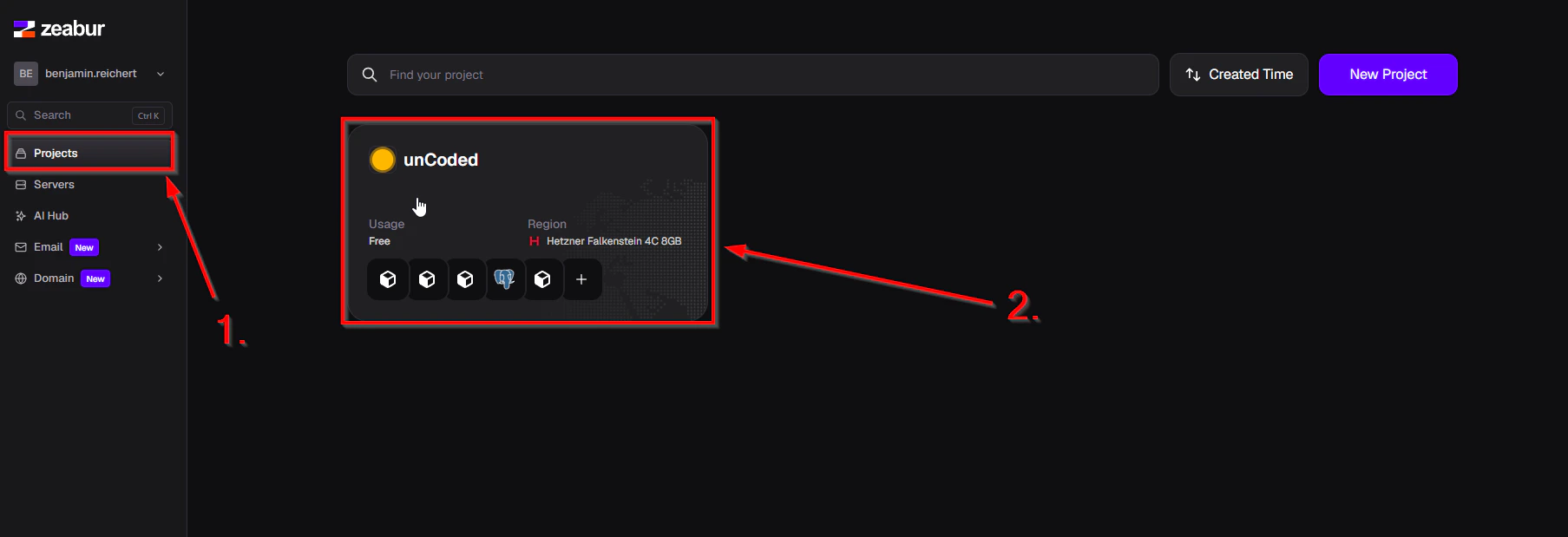 * Go to [https://zeabur.com/projects](https://zeabur.com/projects) and open your unCoded-Project.
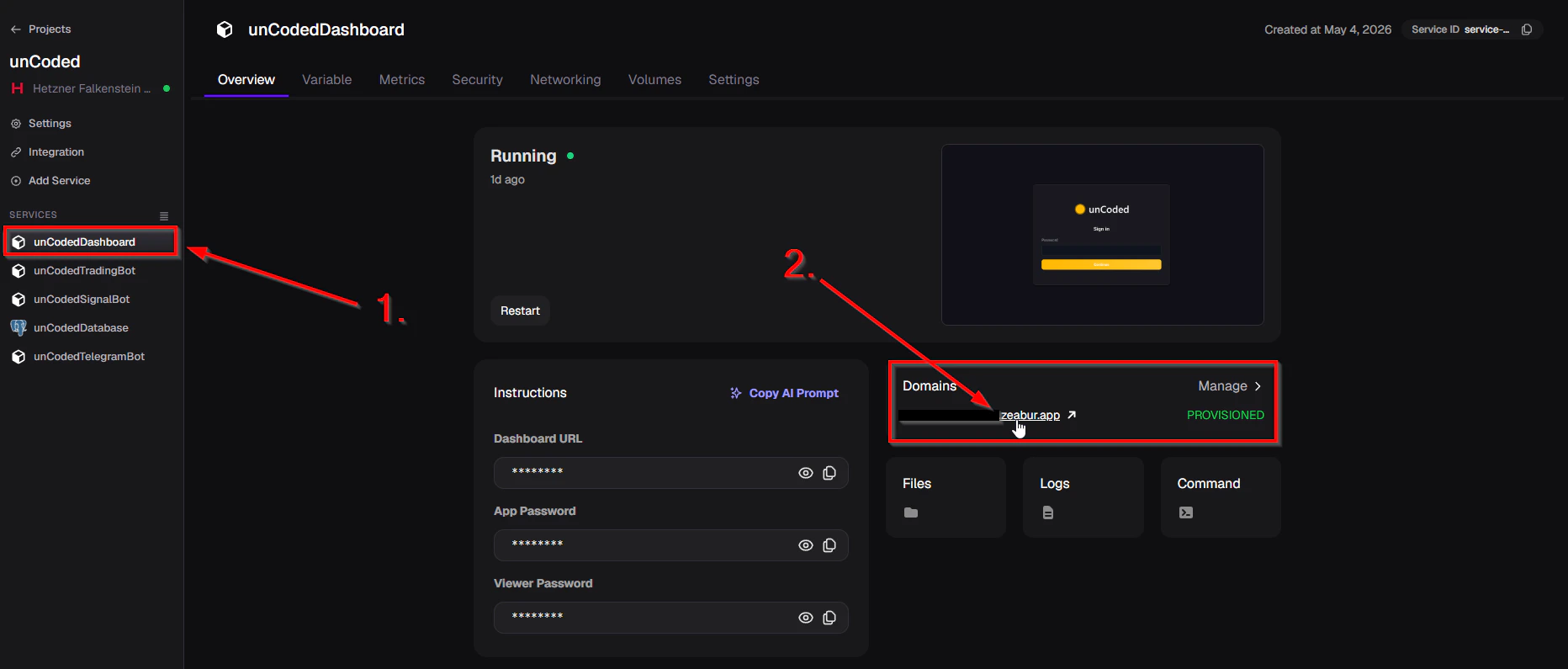 * Click on "unCodedDashboard" and then, under "Domains," click the link you configured (`YOUR-DOMAIN.zeabur.app`).
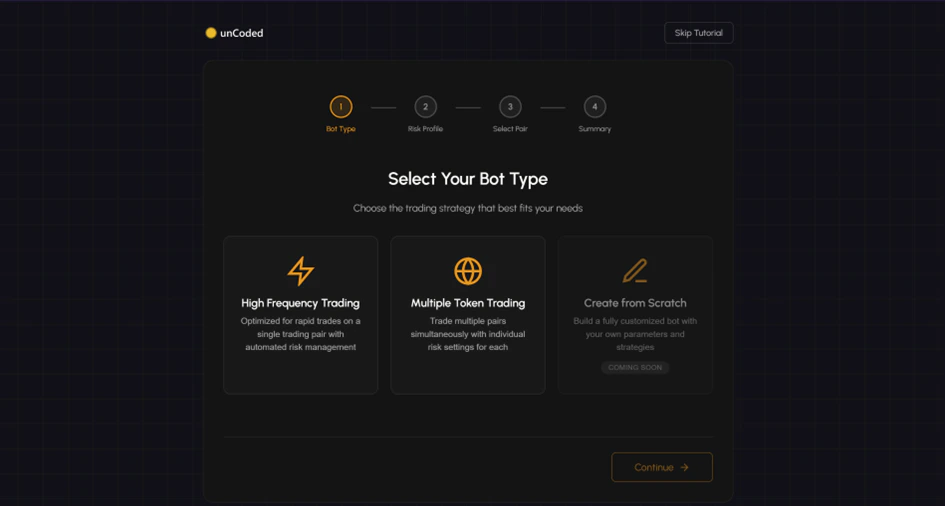 * **Step 1: Select Bot Type**
* **High Frequency Trading:** Best for rapid trades on a single pair with automated risk management.
* **Multiple Token Trading:** Allows trading multiple pairs simultaneously with individual risk settings.
* **Step 1: Select Bot Type**
* **High Frequency Trading:** Best for rapid trades on a single pair with automated risk management.
* **Multiple Token Trading:** Allows trading multiple pairs simultaneously with individual risk settings.
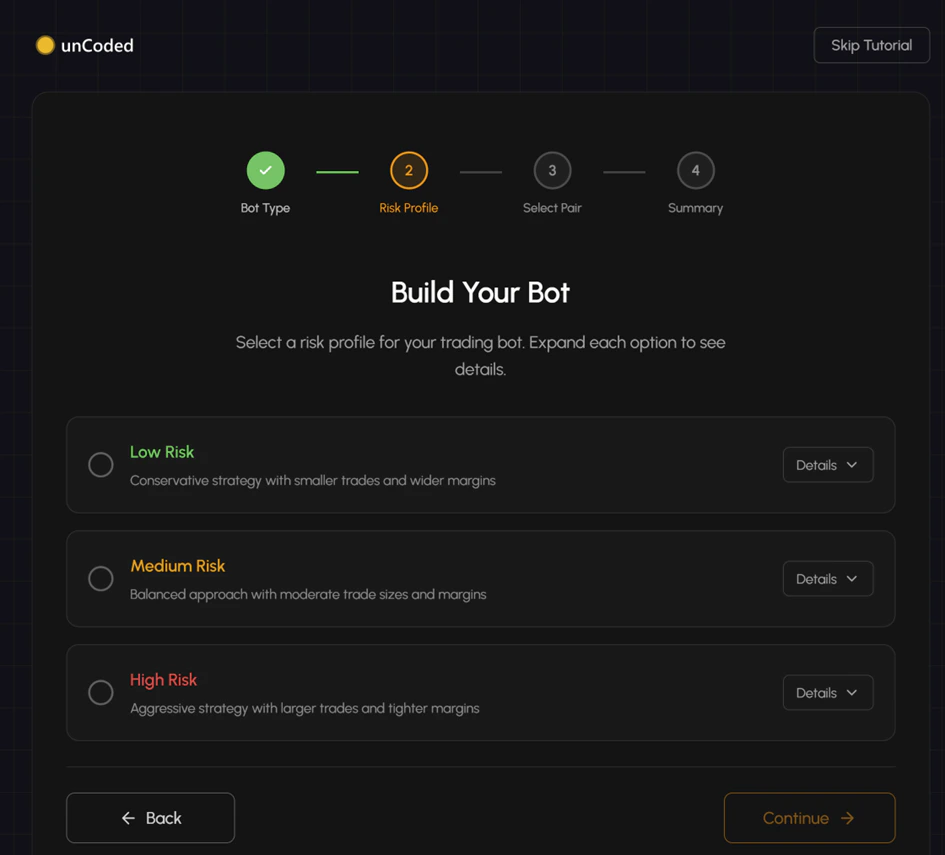 * **Step 2: Risk Profile**
* Choose between Low, Medium, or High Risk. These presets adjust your trade sizes and margins automatically.
* **Step 2: Risk Profile**
* Choose between Low, Medium, or High Risk. These presets adjust your trade sizes and margins automatically.
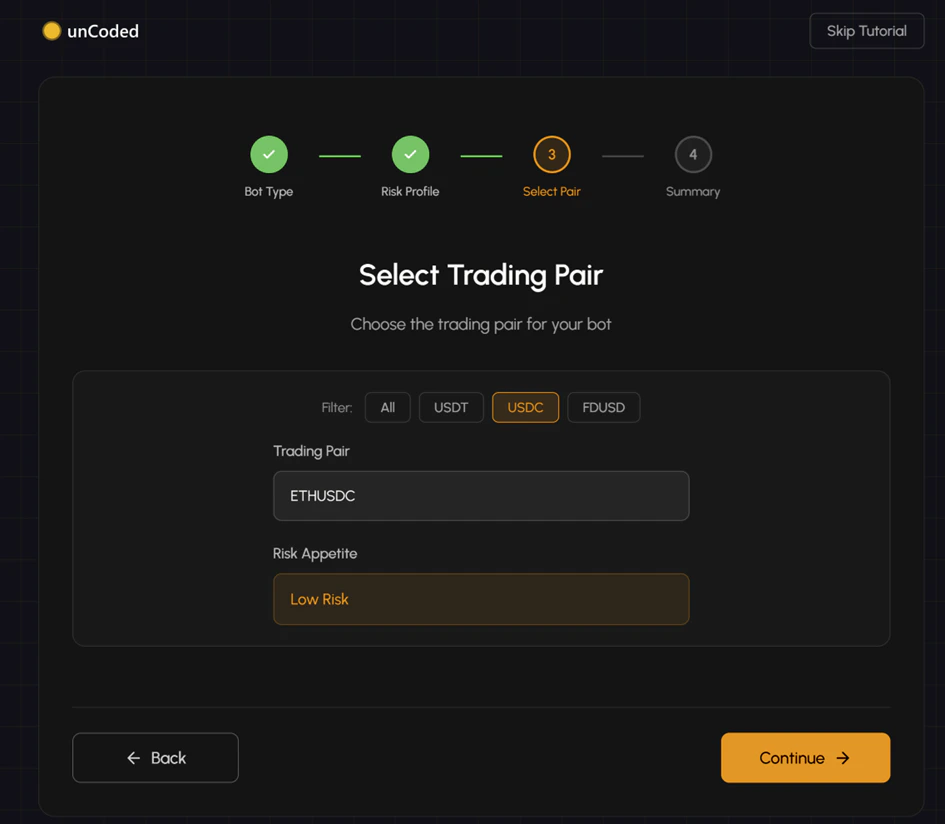 * **Step 3: Select Trading Pair**
* Pick your desired pair (e.g., ETHUSDC). You can filter the list by base currencies like USDT, USDC, or FDUSD.
* **Step 3: Select Trading Pair**
* Pick your desired pair (e.g., ETHUSDC). You can filter the list by base currencies like USDT, USDC, or FDUSD.
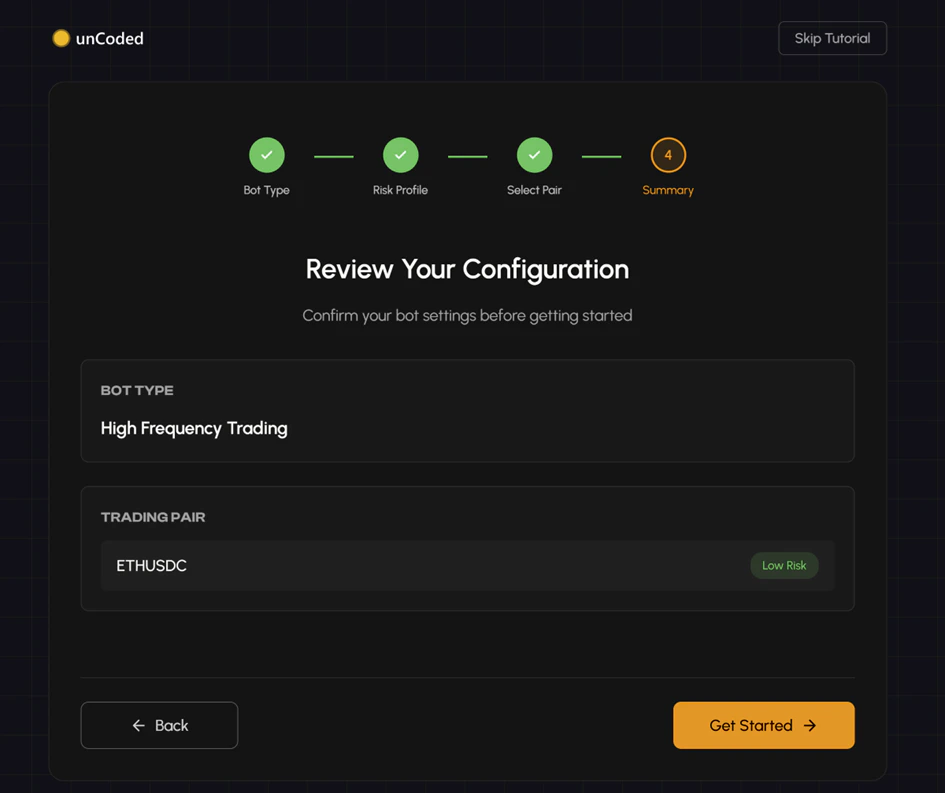 * **Step 4: Summary**
* Review your configuration and click "Get Started" to move to the final activation.
***
* **Step 4: Summary**
* Review your configuration and click "Get Started" to move to the final activation.
***
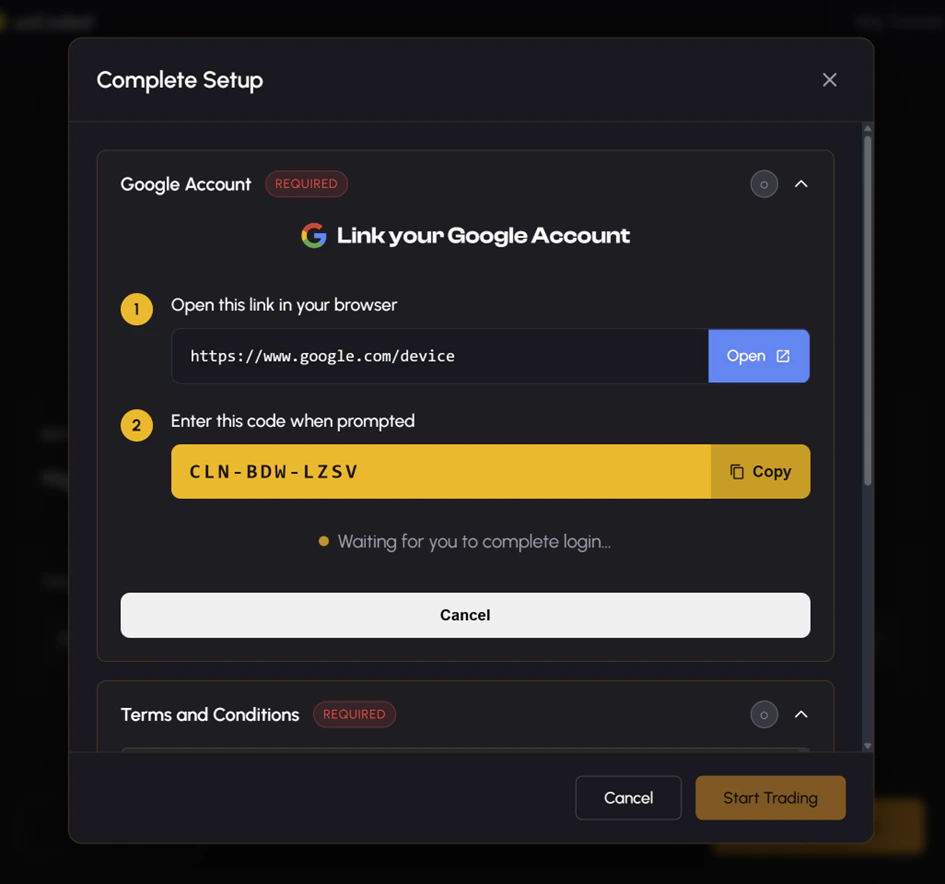 * **Process:** Open the provided Google device link and enter the unique code shown on your dashboard.
* **Important:** You must use **the same** Google Account you used to register at [uncoded.ch/account](https://www.uncoded.ch/account) where your Exchange UID /API Key is deposited.
* The system will display a confirmation once the account is linked and ready.
* **Process:** Open the provided Google device link and enter the unique code shown on your dashboard.
* **Important:** You must use **the same** Google Account you used to register at [uncoded.ch/account](https://www.uncoded.ch/account) where your Exchange UID /API Key is deposited.
* The system will display a confirmation once the account is linked and ready.
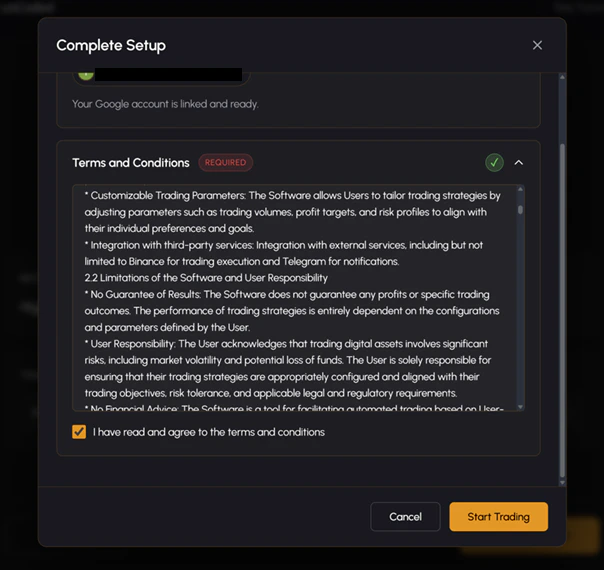 **Terms & Launch**
* Review the Terms of Service.
* Check the box: "I have read and agree to the terms and conditions".
* Click "Start Trading" to go live.
***
**Terms & Launch**
* Review the Terms of Service.
* Check the box: "I have read and agree to the terms and conditions".
* Click "Start Trading" to go live.
***