> ## Documentation Index
> Fetch the complete documentation index at: https://uncoded.ch/docs/llms.txt
> Use this file to discover all available pages before exploring further.
# 1. unCoded Quickstart
This guide gives you a fast overview of everything you need to set up your unCoded trading bot and get it ready for automated trading.
The goal is simple: within about 60 minutes, you should have your bot deployed, connected to your exchange, configured with TradingView alerts, and ready to receive notifications.
***
## What you need before you start
Before starting the setup, make sure you have the following ready:
### 1. unCoded license
You need an active unCoded license to run the bot. The license connects your setup to your account and allows the bot to operate.
Activate your free \$25 trial license [here](https://uncoded.ch/account).
> [**Learn here how to activate your unCoded license.**](/backup-set-up)
***
### 2. Exchange account
You need an account with a supported exchange, such as Binance. You can find [all supported exchanges here](/exchanges-overview-and-selection).
Make sure your account is fully verified and ready for trading before continuing.
### 3. API keys from your exchange
Your bot uses API keys to connect to your exchange account.
You will need:
* API key
* API secret
* The correct API permissions for trading (Spot-Trading enabled, IP-Restriction)
For security reasons, withdrawal permissions should **not** be enabled.
Save 20% on trading fees with the [unCoded Binance referral link](https://bit.ly/B-20Fee). *New customers only.*
> [**Learn here how to set up Binance and create your API.**](/1-create-your-binance-account)
***
### 4. Server hosting
Your bot needs to run on a server so it can stay online continuously.
The [recommended setup uses Zeabur](https://zeabur.com/templates/FX6Y6O), which allows you to deploy and manage the bot without setting up your own server manually.
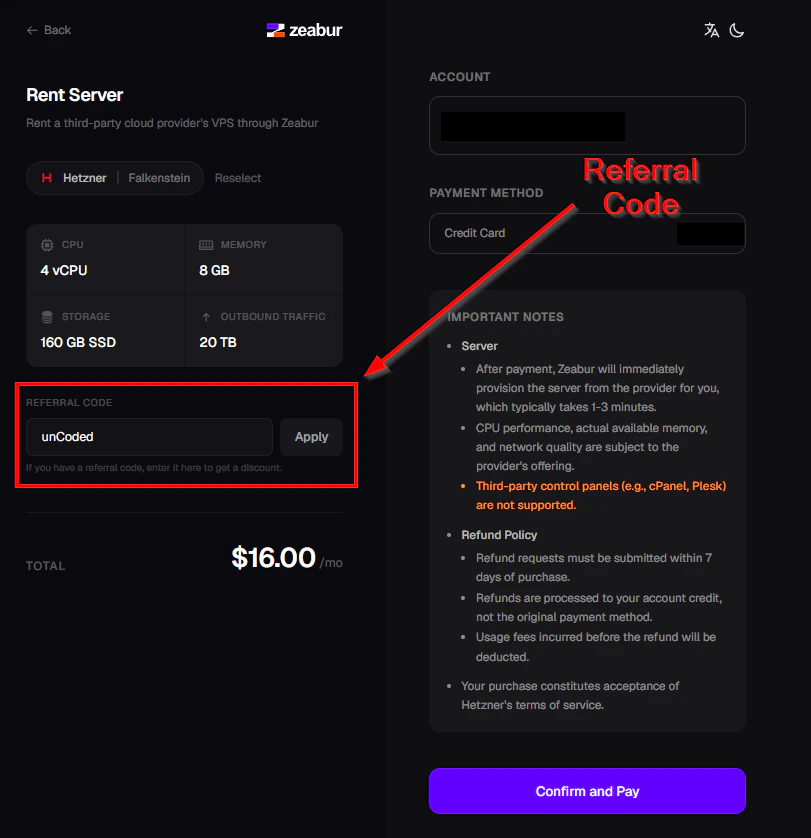
Use the referral code **“unCoded”** during your first server purchase to get **10% off** your server.
 > [**Learn here how to set up your Zeabur Server.**](/zeabur-server-setup)